Skip to content
Operations software for SRS proprietors and NDIS providers

Shifts covered.Paperwork done.Audits ready.

Rooms, rosters, timesheets and audit evidence for every facility you run. Pip, the built-in assistant, drafts the busywork for you to approve.

30 minutes by video, no obligation. $300 a month per facility, plus GST. The first five operators keep it for 24 months.

“I cannot imagine running my facilities without it.”

Proprietor, Alma House · Two SRS facilities in Victoria
Wednesday, 06:04 at Riverbend Lodge: Dev Patel reports sick. June Reilly’s community access shift, 09:00 to 13:00, has no one.Sample data · Riverbend Community Care is an illustrative provider

Built for SRS and NDIS teams.

Your people, places, work, money and records, in one calm place.

  • PeopleClients, staff and appointments
  • PlacesRooms, vacancies and listings
  • WorkRosters, clock-ins, tasks and handovers
  • MoneyXero Payroll and NDIS invoices
  • RecordsIncidents, credentials and readiness

“Once I started with CoveyOS, I cannot imagine running my facilities without it. I have so much more time to deal with real issues than managing paperwork and billing. It’s the only software that precisely serves what I need.”

Proprietor, Alma HouseTwo SRS facilities in Victoria
Rooms and vacancies

An empty room costs you every fortnight. List it in minutes.

Publish your facility and each vacant room on srsaccommodation.com.au, with photos and fees. Enquiries arrive in CoveyOS, and the person you choose gets an email. When someone moves in, the room comes off the site by itself.

What one empty room loses, at a typical SRS fee
$980a fortnight
CoveyOS for the whole facility, listing included, plus GST
$300a month
Room 12 at Riverbend Lodge in Kew is vacant and listed on srsaccommodation.com.au, from $490 a week, with photos. Two enquiries came from the site: one for a family member, waiting for a reply, and one for a client, already contacted. When someone moves in, the room comes off the site by itself.
The film

One week at a facility, in five minutes.

Follow a week at a sample provider: a new resident on Monday, a sick call on Wednesday, an audit check on Thursday.

Paperwork and readiness

Paperwork in order. Audits without the scramble.

Pip drafts each person’s paperwork from their record and chases what’s still missing. Readiness shows what an auditor would find today, so you fix it first.

Following · June’s paperwork and Edna’s fall, Mon 7 to Thu 10 Sep

  1. Monday · Paperwork

    Pip drafts. You sign once.

    When someone moves in, Pip drafts their support plan, risk assessment and emergency evacuation plan from what their record already says. You read each one, then sign them together.

    Pip leaves a blank where the record is silent, and never signs for you.

    June Reilly moved into Room 6 at Riverbend Lodge on Monday 7 September. At 13:02 Pip drafted her support plan, risk assessment and emergency evacuation plan from her referral and NDIS plan summary. Sam Okafor read them and signed all three at 13:10. Her paperwork is now 6 of 7 complete: her consent to share information is still to come from her son, Peter Reilly, by Friday 2 October.
  2. Thursday · Readiness

    Know what needs fixing before the auditor calls.

    Readiness checks staff files, participant files and your registers against the NDIS Practice Standards, live from your records. Each fix has an owner, a date and a link to the page where it’s done.

    A reportable incident starts its 24-hour and 5-day clocks, and Pip drafts the 5-day report for you to lodge.

    Thursday 10 September at Riverbend Lodge. At 14:20 Edna Marsh fell in the bathroom, and Aisha Khan reported it from her phone, INC-2026-000142, with four follow-ups. CoveyOS shows falls are up three weeks running, mostly in bathrooms in the afternoon, so Pip drafted a daily bathroom safety check. Aisha completed the first one at 16:04, and it counts as evidence for falls prevention, which is now met. Readiness for the NDIS audit on Tuesday 22 September reads 31 of 57 checks met. Three would fail today: Ben Ngata’s National Police Check, which expired on 2 September; Emma Liu’s probation review, overdue since Monday 7 September; and Fernhollow Lodge’s emergency drill record, owned by Farah Osman and due Friday 18 September. Two more come due within 30 days: the incident register review on Wednesday 30 September, and June Reilly’s consent to share information on Friday 2 October. Pip offers to gather the newest file of each kind into one audit pack. The audit panic file is stamped Retired.

    Evidence that keeps itself

    1. Edna’s fall in the bathroomThu 10 Sep, 14:20 · Aisha reported it from her phone · 4 follow-upsINC-2026-000142
    2. Falls are up three weeks runningMostly in bathrooms, mostly in the afternoon
    3. Bathroom safety checkFrom Pip · daily at 16:00 · Riverbend Lodge · 6 staff
    4. Evidence for falls preventionFirst check done at 16:04 by Aisha Khan

See who owes what. Pip chases it.

One board shows every document that’s due and who has it. Pip drafts the reminders, and nothing goes until you approve. Family and nominees sign from the link in their email, with no account to set up.

See this on a week like yours, in 30 minutes.

Book my walkthrough
Shifts, hours and pay

One connected view. Fewer loose ends.

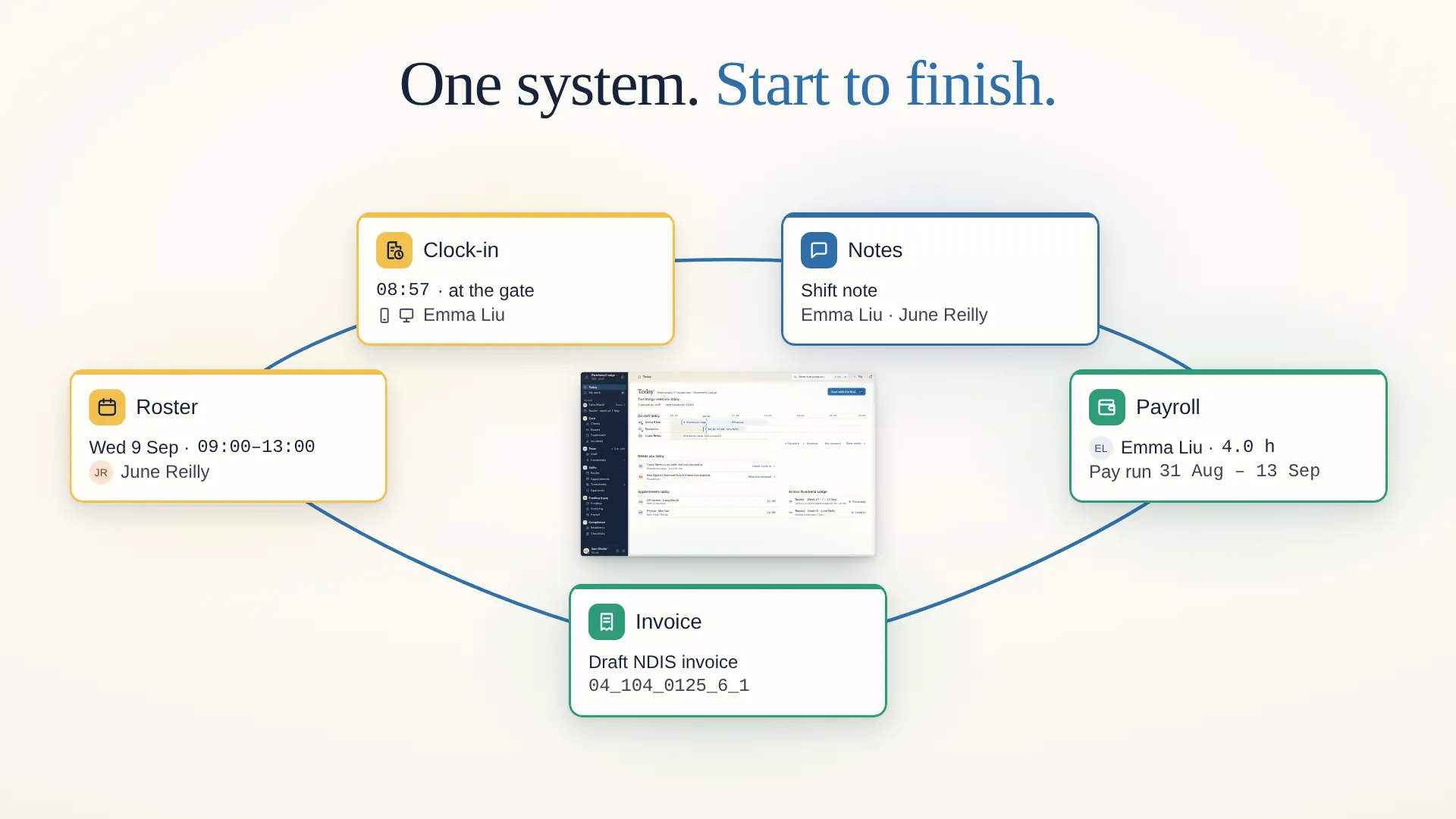
Roster a shift once, and the clock-in, the note, the payroll and the invoice all follow. Nothing gets typed twice.

One shift, start to finish. Emma Liu covers June Reilly’s community access on Wednesday 9 September, 09:00 to 13:00. She clocks in at 08:57 at the gate, and CoveyOS checks she is on site. Pip drafts her shift note from her few words, and she saves it at 13:18. Her 4.0 hours go to the pay run for 31 August to 13 September, and the same hours become a draft NDIS invoice, item 04_104_0125_6_1.
  • See what needs you, at every facility.

    Today lists what needs you across your sites, each with its fix. Pip notices the rest and offers the next step.

  • A roster that checks itself.

    Credentials and sleepover cover are checked before you publish. Only the people whose week changed hear about it.

  • Open shifts fill themselves.

    Pip sends an open shift to staff phones as an offer, and the first yes takes it.

  • Clock-ins become hours.

    Staff clock in at the kiosk with a PIN, or on their phone at the gate, checked against the site. Pip writes the shift note from a few words.

  • Approve once. Send to Xero.

    Approved timesheets go to Xero Payroll as drafts, and the same hours become a draft NDIS invoice.

  • Funding that lasts the plan.

    The plan budget suggests the weekly hours that make a participant’s funding last to the end of their plan.

Your team’s day

Nothing falls between shifts.

Handovers, appointments, tasks and staff records sit beside the roster, so each shift picks up where the last one stopped.

  • Handovers the next shift reads.

    Staff fill in the handover note before they clock out, and Pip can draft it for them. The next worker finds it waiting when they clock in.

  • Appointments nobody misses.

    Book a resident’s GP visit, name who takes them and set a reminder. CoveyOS flags a double booking, and you mark each visit attended.

  • Every task has an owner.

    Give a task to one person, with a due date and a link to the resident or incident it concerns. Overdue tasks stay on Today until someone closes them.

  • Staff records that stay current.

    Credentials, right-to-work and reviews sit on each staff profile. CoveyOS warns you before a check expires or a review falls due.

Pip, your co-pilot

A clearer next step, with Pip.

Ask in plain English. Pip reads your records, your procedures and your inbox, drafts the paperwork and the next step, and nothing changes until you say so.

Nothing changes until you say so.

Pip will add this when you approve

Book Edna’s GP review with Dr Vu

When
Fri 11 Sep, 10:00–10:30
Duration
30 min
Client
Edna Marsh
With
Dr Anh Vu

Approving adds it to Edna’s appointments.

Pip will change this when you approve

Make Ruth Marsh Edna’s emergency contact

Client
Edna Marsh
Role
Emergency contact
Contact
Ruth Marsh (daughter)

Approving changes Edna’s contacts.

Pip’s dock is open on Edna Marsh. You ask Pip: After Edna’s fall, book her a GP review with Dr Vu, Friday 10 to 10:30, and make Ruth her emergency contact. Pip answers: Friday 10:00 is clear with Dr Vu. Two changes, ready for you. Pip read: Edna Marsh, Appointments, Edna’s contacts, Ruth Marsh. The result: two changes Pip drafted, each waiting for your approval. Try them below; this example changes nothing.

Example conversations · Pip’s wording varies

Pricing

One price per facility. Everything included.

$300per facility, per month, plus GST

  • Every feature on this page, from the roster to readiness
  • Pip, the built-in assistant
  • The staff app, kiosk and phone clock-in
  • Your facility and vacant rooms listed on srsaccommodation.com.au
  • No per-staff fees
  • Set up with you, then a checklist for the rest
Founding operators

Keep $300 a month for 24 months.

Your price can’t rise in that time, whether you pay month to month or yearly.

Or pay yearly: $3,000 for your first year instead of $3,600. That’s two months free.

Open to the first five operators.

Pay month to month, or yearly. Export all your data at any time. Prices exclude GST.

Built for the way your facility works.

  • Set it up once.

    We set up every facility with you. Then a checklist covers your sites, rooms, staff, clients, services, shifts, first roster and clock-in. Pip adds your rooms when you approve.

  • The right access for each role.

    Owner, Admin, Lead, Care and Staff app access, site by site. Support workers see only the clients where they work, so a worker at Wattlebrook House sees Wattlebrook’s clients. CoveyOS shows why a person can see a client or a colleague, and access changes are logged.

  • Your data stays yours.

    Each organisation’s records are kept apart in the database. Export all your data at any time, and correct or delete records with the right permission.

  • Pip asks first.

    Pip sees only what you can see. Nothing changes until you say so, and every proposal and result is recorded.

See your facility working as one.

Care is the work. CoveyOS carries the rest. Book a walkthrough, and we’ll show you a week in CoveyOS, from the roster to the audit.

Founding operators: $300 a month per facility, plus GST, kept for 24 months. Open to the first five operators.

Tell us about your facility, and we’ll contact you to arrange a time.

A 30-minute video call. We show you CoveyOS on a week like yours, then answer your questions.

CoveyOS | Shifts covered. Paperwork done. Audits ready.